 |
|
| |||
|
* This page is made by "machine translation" program from Japanese to English.
|
To you who make a graph from Excel of Microsoft (Microsoft Corp.)
In some cases, I want whether to copy the graph made one in the same sheet, and to make the graph with one [ same ] more. I also reproduce in advance in preparation for failure, also when changing the appearance of a graph sharply. Moreover, a duplicate is first copied [ the time of wanting to also make the graph of another style from the same data, and ] to the beginning to make the graph of the same style from another data. however, the tool of other Microsoft Corp. -- being different -- a graph -- choosing -- a copy (Ctrl-C) -- sticking (Ctrl-X) -- it is not reproduced even if it carries out . which may not react at all whether the program of Excel lapses into an endless loop at the moment of carrying out this operation although it will be based on a version, not to mention it, -- if it becomes so -- the task manager of Windows -- starting -- an application tab -- the task of Excel -- choosing -- task termination -- pushing -- time -- sushi -- being lost . -- the work updated by Excel in this case -- useless -- becoming -- heavy-loss damage .... Then, as to what it should carry out, it will be O.K., if the graph is chosen and it drags with a mouse (lower figure). 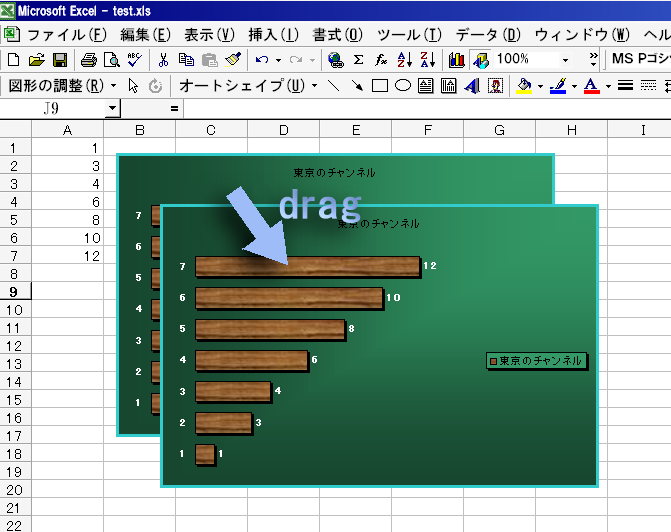
After moving to a location to push a drug, i.e., a left button, on and set a graph new as it is, it is detaching a left button. A graph becomes less dreadful now. |


- Copyright © sonobelab.com, Masayuki Sonobe 2003-2024.
- Updated 5422 days ago: 2009. 7. 2 Thu 19:19
- Accesses to the Page since 2003.04.18
00,008,696
- Accesses to Sonobe's since 2002.07.01
05,125,033
